Can You Access Your WHOOP Strength Trainer Data? (2026 Answer)
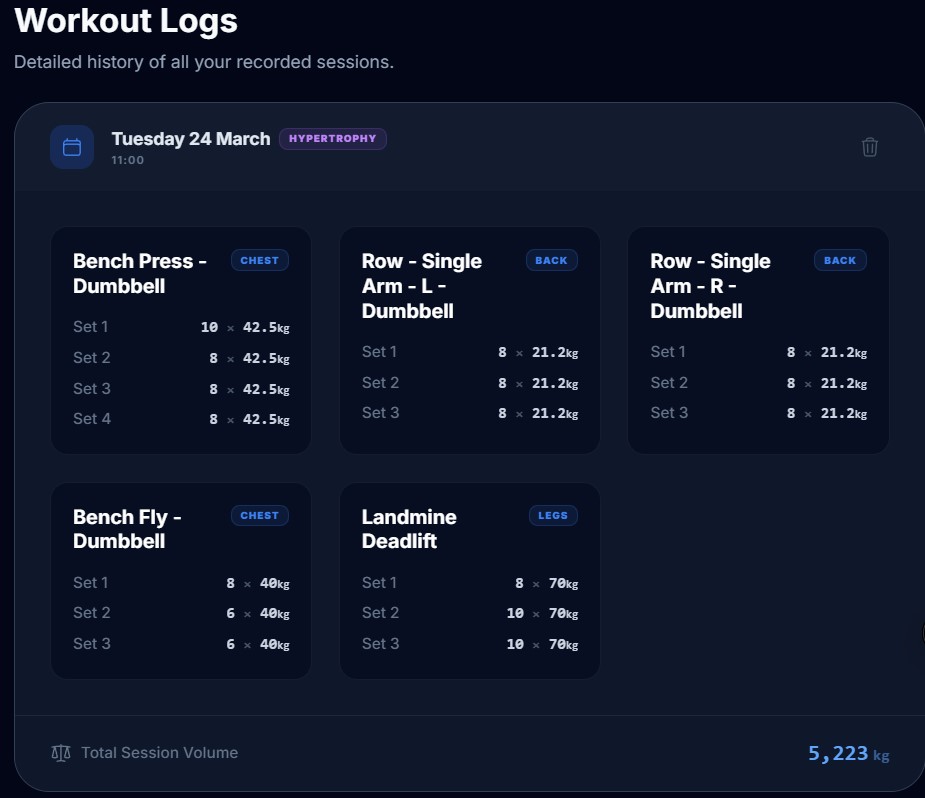
Short answer: WHOOP's API exposes recovery scores, HRV, and sleep — but not your sets, reps, or weights from Strength Trainer. That data exists inside WHOOP, but they don't share it programmatically. Here's what you can access, what you can't, and the screenshot-based workaround that fills the gap.
The practical workaround
You don't need API access. StrengthInsight extracts your data from screenshots — and turns it into actual progression tracking.
- Full lift history from WHOOP Strength Trainer screenshots — no export, no API key
- Estimated 1RM trend per exercise, updated each session automatically
- Lift records: Peak Load, Best Session Total, Last PR & PR drought counter
- Progress labels: Getting Stronger / Plateauing / Taking a Dip — per exercise
- AI-generated next workout built from your actual lift data and recovery score
What "access" means (and what most people actually want)
Most people asking this question aren't trying to build a dashboard or run statistical models on raw sensor data. They want something much more specific:
- Their workout history — dates, exercises, sets, reps, weights — in a usable form
- A way to see whether their lifts are improving over weeks and months
- Something that fills the gap WHOOP leaves: great at recovery, weak at showing per-exercise progression
With that framing in mind, here's the honest picture of what's available.
What WHOOP's API actually exposes
WHOOP does have a developer API. It exposes:
- Recovery data: daily Recovery Score, HRV, resting heart rate, sleep performance
- Sleep data: sleep stages, sleep duration, sleep consistency
- Physiological cycles: strain score, energy expenditure
- Workout summaries: activity type, strain, duration, heart rate zones
This means that if your goal is programmatic access to your strength session data — for progression analysis, export to a spreadsheet, or integration with another tool — the official API won't give you what you need.
Practical options for getting Strength Trainer data out
1) Screenshot extraction (fastest, works today)
The most practical path available right now is to take a standard screenshot of your WHOOP Strength Trainer session summary after each workout. A screenshot captures everything visible on screen: exercises, sets, reps, and weights.
This is exactly what StrengthInsight is built around. Upload the screenshot and AI extracts the full session data automatically — no manual entry, no developer setup, no waiting for WHOOP to expand their API.
- Pros: works immediately, no technical setup, same data you already see in the app
- Cons: requires a screenshot after each session (a 10-second habit)
2) In-app history (view only, no export)
Inside WHOOP, you can scroll back through past strength sessions and view exercise details. This is useful for a quick reference but doesn't provide a progression view or export capability — you're reviewing individual sessions, not trends.
- Pros: always available, no additional tools needed
- Cons: session-by-session only, no trend view, no progression analysis
3) Official account export (limited for strength data)
WHOOP offers data export options at the account level. The usefulness for strength-specific data varies — export formats may include workout summaries and physiological data, but the per-exercise sets/reps/weights from Strength Trainer are typically not included in a clean, usable format.
- Pros: covers broader WHOOP health data
- Cons: strength session detail is generally absent or incomplete
What you actually get with the screenshot approach
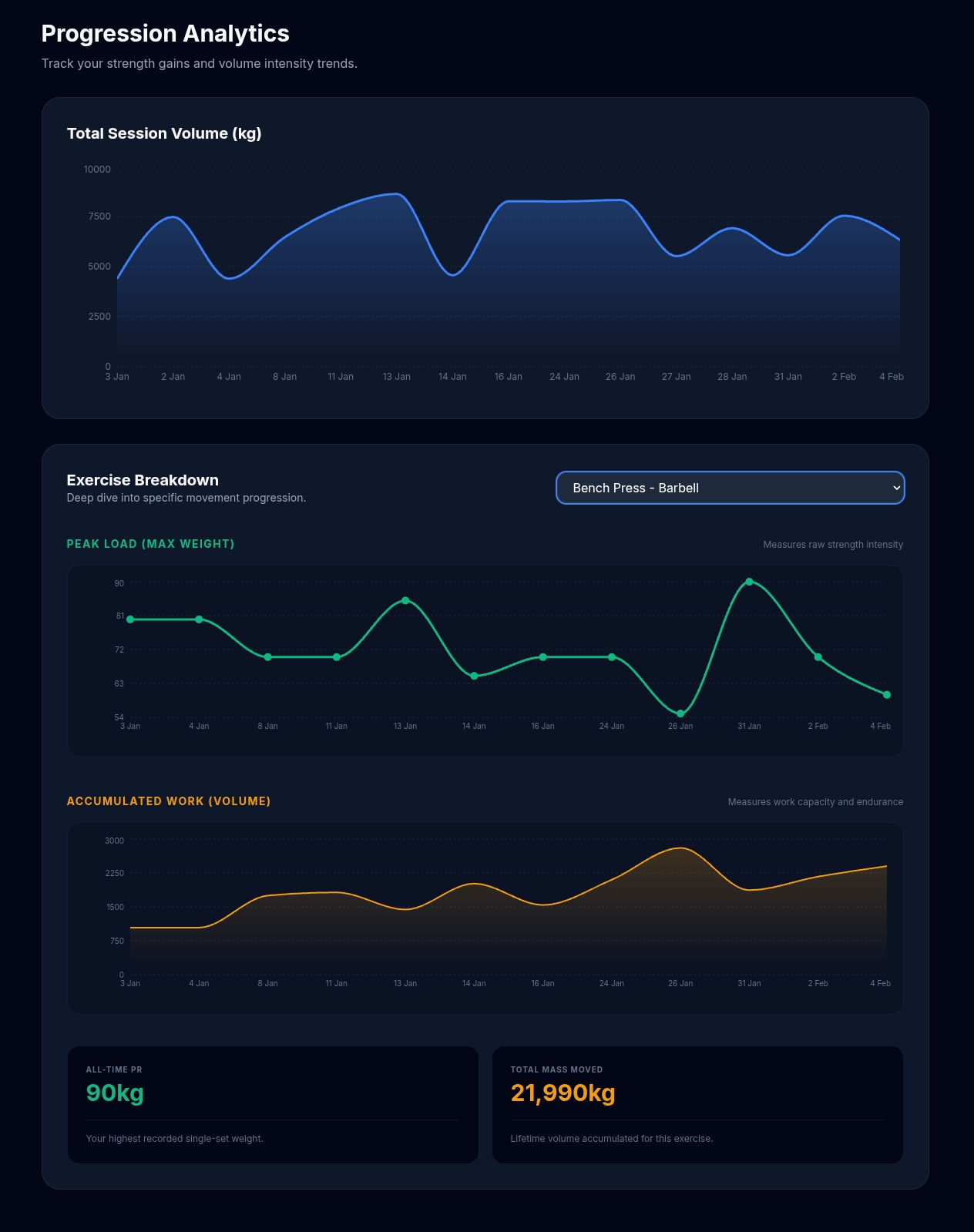
If your underlying goal is progression visibility — "am I getting stronger, which lifts have stalled, what should I do next session" — the screenshot approach via StrengthInsight gives you substantially more than a raw data export would:
What StrengthInsight provides
Forget the API. Here's what you actually get from a screenshot.
- Estimated 1RM trend per exercise — see whether bench, squat, and deadlift are improving over time
- Lift records: Peak Load, Est. Max Strength (1RM), Top Set Output, Best Session Total
- PR tracking: date of last PR and PR drought counter per exercise
- Progress labels: Getting Stronger / Plateauing / Taking a Dip — updated each session
- Plateau detection — automatic flag when a lift has been flat for multiple sessions
- Weekly Performance Matrix — full view of training across exercises and weeks
- Recovery context — WHOOP recovery score shown alongside lift data
- AI-generated next workout — built from your actual lift history and recovery
How it works
FAQ
Can I export WHOOP Strength Trainer workouts to a spreadsheet?
Not cleanly via the official API or standard export, as exercise-level sets and reps aren't exposed in a structured format. The practical alternative is to use StrengthInsight's screenshot extraction, which automatically reads your session data and builds your lift history — without needing a spreadsheet at all.
Is there a simple way to see progression without exporting everything?
Yes. You don't need a full historical export to get useful progression data. A few recent sessions are enough to start building trend views for your main lifts. StrengthInsight is designed for exactly this: upload 2–3 screenshots and you already have estimated 1RM trends, lift records, and plateau status for each exercise.
Will WHOOP add Strength Trainer data to their API?
Possibly — platforms do evolve. But waiting on a future feature is a poor reason to miss progression visibility today. The screenshot approach works now, with the data you already have.
Does StrengthInsight connect directly to WHOOP?
StrengthInsight does not use a direct API integration for Strength Trainer data, because WHOOP doesn't expose it. Instead, it works via screenshot extraction — you upload a screenshot of your session summary and AI reads the data from the image. This is independent of whatever WHOOP chooses to make available via API.
Does Hevy have the same API limitation?
No — Hevy has a more open API that exposes workout history including exercises, sets, reps, and weights. If API access to your strength data matters to you, Hevy is the more open option. StrengthInsight supports both.
📈 Your WHOOP data, made actually useful
Upload a screenshot — get your full lift progression view
No API needed. No manual entry. StrengthInsight extracts your sets, reps, and weights from a WHOOP Strength Trainer screenshot and builds your progression charts, lift records, and AI next workout automatically. Free to start.
Upload a WHOOP Screenshot →Related: How to track lift progression with WHOOP Strength Trainer