Strength Tracking Guide
How to Track Strength Progression with WHOOP Strength Trainer
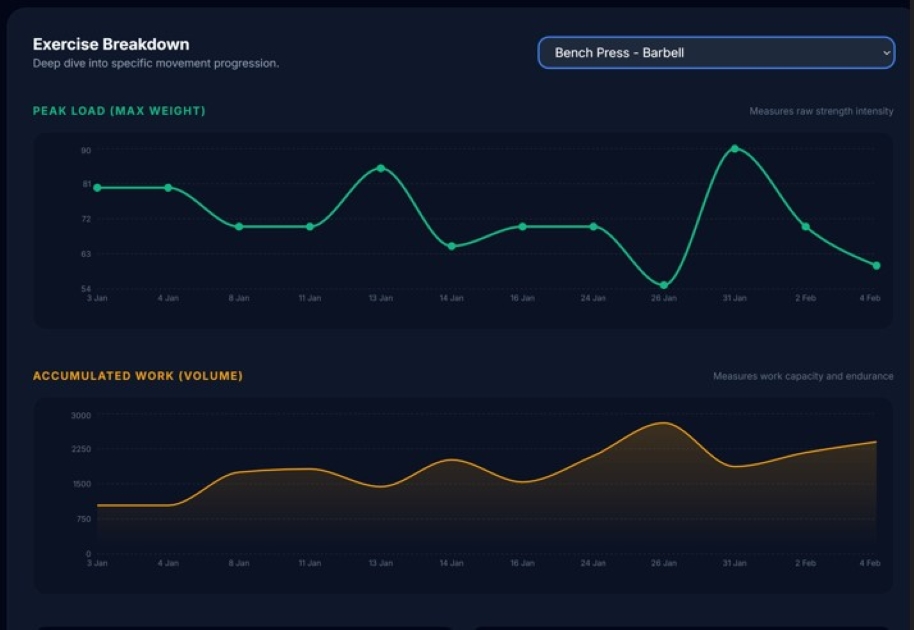
WHOOP Strength Trainer logs your workouts. But if you open it up and try to see whether your bench press has improved over the last 8 weeks — you can't. The history is there. The charts aren't. This guide covers exactly what WHOOP does and doesn't show, and how to fill the gap.
The direct answer to this gap
StrengthInsight shows the per-exercise progression data WHOOP doesn't — from your existing screenshots, no manual entry required.
- Estimated 1RM trend per exercise — see week over week whether a lift is actually improving
- Lift records: Peak Load, Est. Max Strength, Best Session Total, Last PR & PR drought counter
- Progress labels: Getting Stronger / Plateauing / Taking a Dip — updated each session
- Plateau detection — automatic alert when your peak load has been flat for multiple sessions
- AI-generated next workout that uses your actual lift history and recovery score together
What WHOOP Strength Trainer shows today
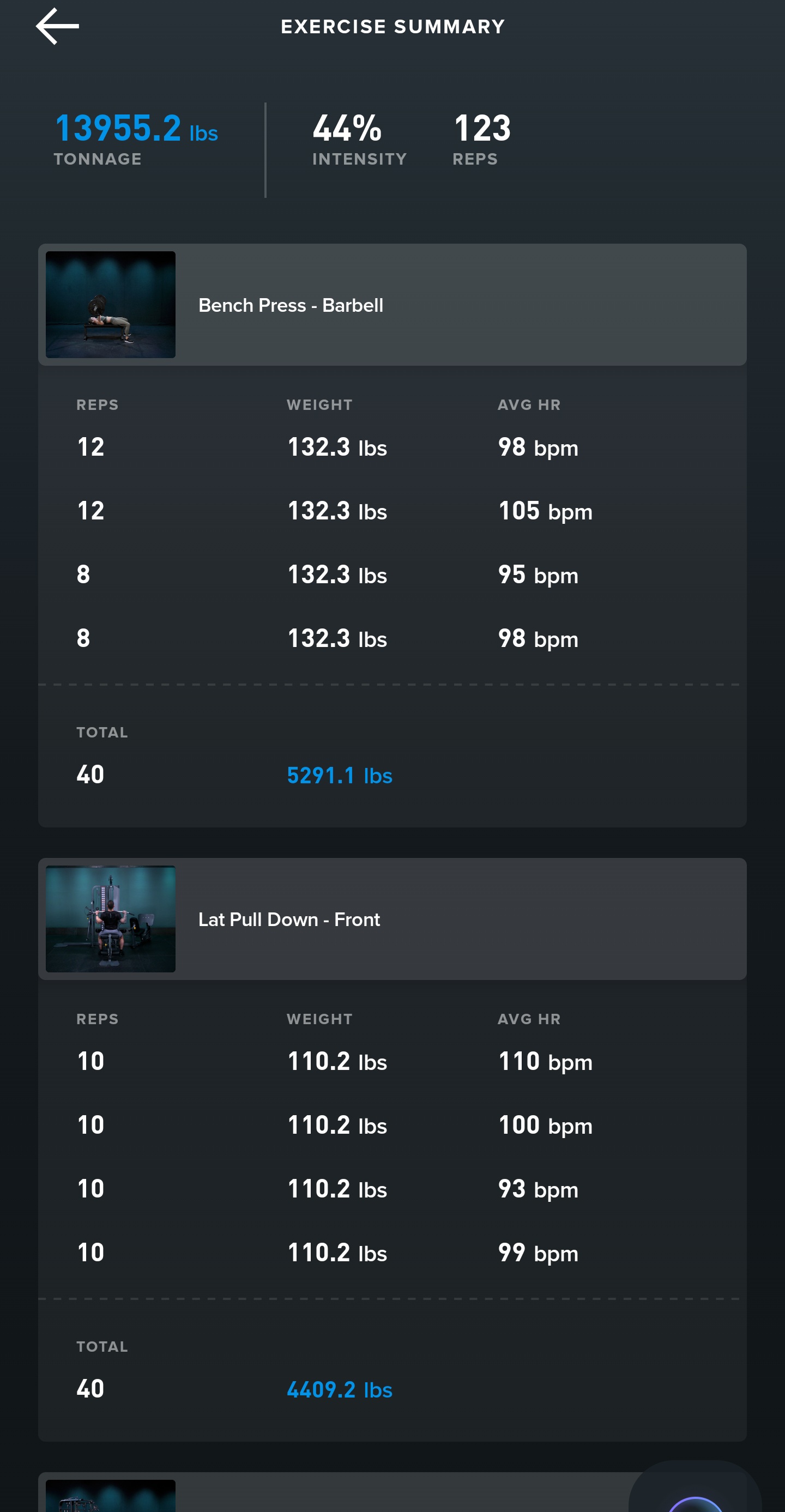
WHOOP does a genuinely useful job of capturing your strength sessions. After a workout, the Strength Trainer screen shows:
- A record of exercises, sets, reps, and weight (where you've entered them)
- Session-level summaries and strain scores
- Useful context alongside your recovery data and heart rate
That session-level view is great for reviewing what you just did. The problem is when you want to look further back — and further forward to verify your training is actually working.
The gap WHOOP doesn't fill
Here's the thing WHOOP Strength Trainer doesn't do well: it doesn't show you whether your bench press has improved over the last 8 weeks. The history exists inside WHOOP — it's just buried, session by session, with no way to visualise it as a trend.
You can scroll back through past workouts manually, but there's no chart showing your bench press max week over week. No view that tells you whether your squat volume has been climbing or flat-lining. No alert that you've been stuck at the same weight for four sessions in a row.
→ See your progression trend automatically
This is the core gap: WHOOP is excellent at strain and recovery — which is a physiological layer. But strength progression is a mechanical layer that requires tracking load, reps, and volume across time per exercise. Without that, you're still guessing whether your programming is working.
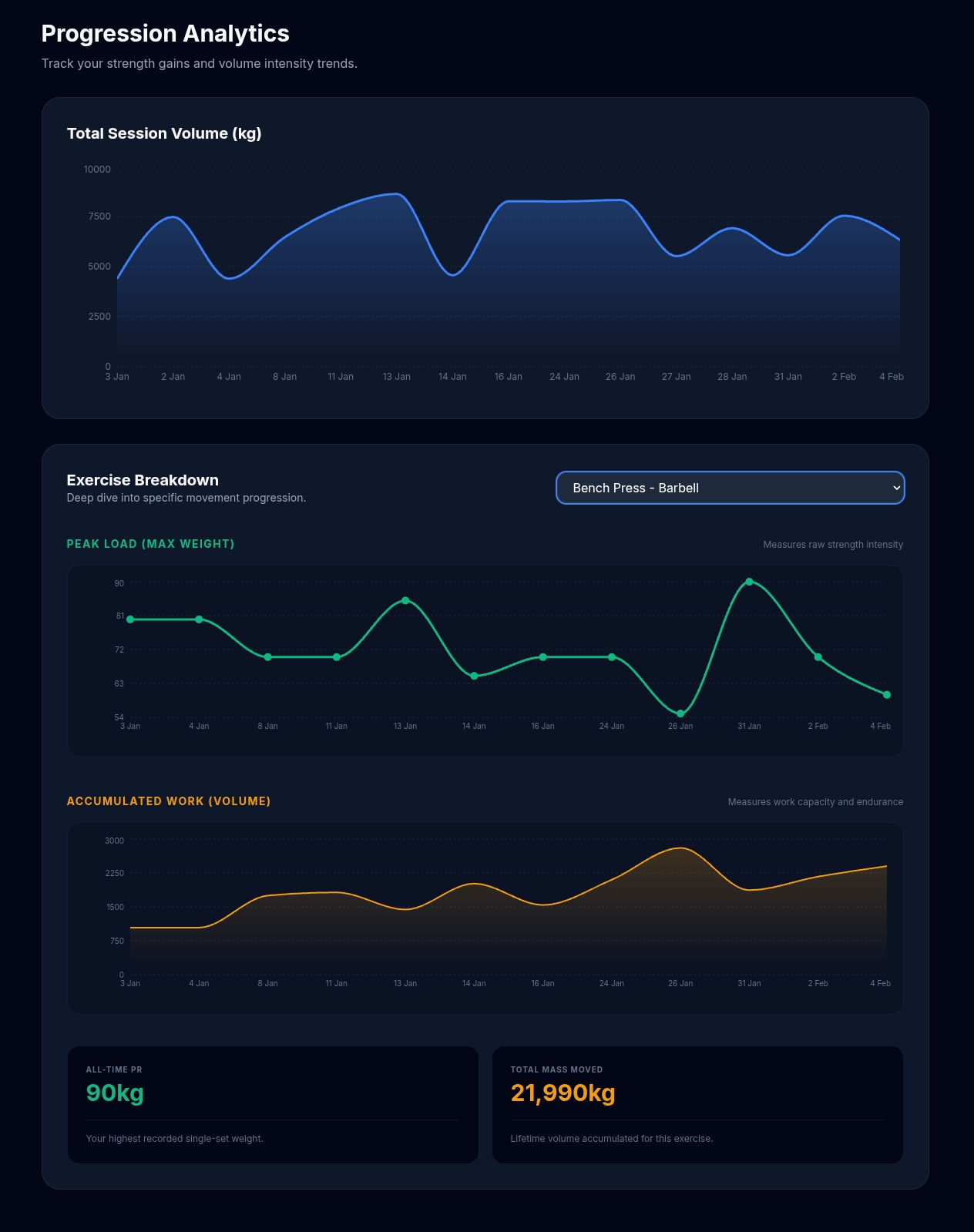
What progression tracking actually looks like
Useful strength progression data has a few core elements. If you can see all of these for each of your main lifts, you can make genuinely informed decisions about your training:
- Estimated 1RM trend over time — the best single number for tracking whether a lift is improving. Uses your best set each session (weight × reps via the Epley formula) to produce a smoothed picture of your strength. A flat line for 4+ weeks is a plateau; a rising line is progress.
- Best set per session — heaviest single set weight, tracked week to week. Simple and direct.
- Volume per session — total reps × weight for the exercise. Volume trends tell you whether you're doing more total work, even if your max load hasn't moved yet.
- Plateau detection — an alert when your peak load and volume have been within a few percent of each other for the last 4 sessions. This is the signal to change something.
No PR tracking in WHOOP Strength Trainer alone? → Track your PRs automatically
To put this concretely: seeing that your bench press estimated 1RM has been flat for 4 weeks is actionable — you know you need to adjust load, volume, or recovery. Knowing your session strain was 12.3 tells you how hard you worked that day, but not whether you're getting stronger. Both matter; you just need both layers.
What StrengthInsight shows that WHOOP doesn't
StrengthInsight is a free companion tool built specifically to add the progression layer WHOOP doesn't have. Here's the direct comparison:
| Feature | WHOOP Strength Trainer | StrengthInsight |
|---|---|---|
| Session logging (sets, reps, weights) | ✓ Yes | ✓ From screenshots |
| Recovery score & HRV | ✓ Yes | ✓ Shown alongside lift data |
| Per-exercise progression trend | ✗ No | ✓ Estimated 1RM chart |
| Lift records (Peak Load, Best Total) | ✗ No | ✓ Per exercise |
| PR tracking & drought counter | ✗ No | ✓ Days since last PR |
| Plateau detection | ✗ No | ✓ Auto-flagged |
| Progress labels (Stronger / Plateauing) | ✗ No | ✓ Per session |
| Weekly Performance Matrix | ✗ No | ✓ Full training view |
| AI-generated next workout | ✗ No | ✓ Recovery-aware |
How it works in practice
Turn your WHOOP sessions into actual progression data
What the data shows over time
Most users who track consistently for 6–10 weeks start to see patterns they genuinely couldn't see before. Volume trends on compound lifts tend to be the first thing that becomes clear — you can see whether squats or deadlifts are actually getting more work week over week, or whether certain exercises are getting quietly dropped.
The plateau detection tends to fire most usefully on accessory lifts. It's easy to plateau on something like lateral raises or tricep pushdowns for weeks without noticing — because you're focused on the big compounds — and then wonder why your shoulders or arms aren't responding. A consistent log makes this visible in a way that WHOOP alone doesn't.
→ Spot plateaus before they cost another training block
For lifters who train 3–4 days a week, around 8–12 uploads gets you enough data to see a meaningful trend on your main movements. After 10 weeks you can start to see which training blocks worked and which didn't — not based on how hard your sessions felt, but on what the actual numbers did.
Why progression can look flat even when you're working hard
A few common reasons the data looks stuck, even if training is consistent:
- Missing data — if weights or reps aren't recorded in WHOOP consistently, the trend lines have gaps that make progress invisible
- Too much exercise variation — rotating exercises frequently means fewer data points per movement, so trends take longer to emerge
- No baseline comparisons — without a tool that shows "last 3 sessions vs. prior 3 sessions," a plateau can go unnoticed for weeks
- Recovery and fatigue masking performance — a bad week can look like a regression when it's just fatigue; the trend over 6–8 weeks is more reliable than any single session
This is where having both layers — WHOOP's recovery data and StrengthInsight's progression data — becomes genuinely useful. You can tell a regression from a fatigue dip because you can see both the HRV context and the lift trend at the same time.
📈 Ready to see if you're actually getting stronger?
See the progression data your WHOOP screenshots already contain
Upload 2–3 recent WHOOP Strength Trainer sessions. StrengthInsight builds your progression charts automatically — estimated 1RM trend, lift records, plateau detection, and an AI-generated next workout. Free, no credit card required.
See Your Lift Progression →